


Lecture Outline
Lecture Outline (Oral Presentations) Lecture Outline (Poster Presentations)
Disclosure of Conflict of Interest (COI)
All presenters are required to disclose any conflicts of interest (COI).
For oral presentations: Please disclose any conflicts of interest (COI) on your presentation slides. Please refer to the sample slide template (PPT) and include your COI disclosure on the second slide of your presentation.
For poster presentations: Please include your COI disclosure at the bottom of your poster, in the same manner as for oral presentations.
For further details and sample slides, please refer to "Disclosure of Conflict of Interests".
A. Presentation Time
- [Plenary Lectures / Special Lecture / Symposia / Workshop 6] at the direction of organisers
- [Workshops 1~5] Presentation time: 15 min (including 3 min. Q&A)
- [Oral Sessions] Presentation time: 12 min (including 3 min. Q&A)
* Please be seated at the next presenter’s seat prior to the beginning of your presentation.
* Please adhere strictly to the allotted presentation time.
* The presentation time is subject to change.
B.Pre-submission of Slides
To reduce congestion at the PC reception desk on the day of the meeting and ensure smooth operation, we kindly ask oral presenters to upload their presentation files in advance via Confit.
- Pre-submission period: October 1 (Thu.), 2026, 10:00 AM – October 16 (Fri.), 2026, 5:00 PM (JST)
- Presenters scheduled for the morning sessions on November 2 are particularly encouraged to submit their presentation files in advance.
- Presenters who have submitted their presentation slides in advance do not need to visit the PC registration desk unless they wish to check how their slides appear on-site and wish to check for issues such as garbled text or image resolution.
- Further details regarding the advance submission of presentation files will be provided by email at a later date.
C.Presentation Data
- OS:
Windows 11
macOS Sonoma 14.5 or later - Application:
Windows version PowerPoint Office365 (compatible with 2013,2019,2024)
Macintosh version PowerPoint Office365 (compatible with 2013,2019,2024) - The presenter tools cannot be used.
- Font:
OS (Windows11, macOS) standard
*Please note that if you use a font other than those listed above, the text may not display correctly. - Slide size and Resolution
Slide size:Please use 16:9 format
*It can be projected in 4:3 format, but there will be white space on either side.
Resolution:Full-HD(1920×1080)
*Please set your computer’s resolution to Full HD before checking the layout. - Use of video and sound
If you have any reference files, such as videos, please place all the data in the same folder.
*Notes on video files
MP4 (H.264) format, WMV format is recommended.
From Office 2010 onwards, there is a feature that allows you to embed video files into PowerPoint files; however, as issues with data links may arise, please bring the video file itself and your computer with you, just in case. - Functionality check
Please ensure that the prepared slides work correctly on a different computer. - Operations on the day
During your presentation, please use the mouse and buttons on the lectern.
The monitor on the lectern will display the same slides as the screen. - Presentation Language
[English]:PLenary Lectures 1&2, Special Lecture, Symposia 1-9, Workshops 1-6
[English/Japanese]:Oral and poster presentations(same language with the abstract)
D.Schedule on the Presentation Day
- Please visit the PC desk(at least 30 minutes prior to the presentation time)
*Those who pre-submit the data online do not need to check in (unless you prefer to check the data appearance onsite).
The PC desk will receive the slide data.
*Please bring the slide data on a USB memory stick.
*If you are bringing your own PC, please bring it to the PC desk. If your laptop or tablet does not have an HDMI or D-sub port, please ensure you bring an external output connector that converts to HDMI or D-sub15-pin. We recommend using genuine manufacturer products where possible. - Please be seated inside the room(15 minutes prior to the presentation time)
*Please visit the technical staff in the room, if you are bringing your own PC. - Start of the lecture
Please take the stage when it is time for your presentation. The chair will give an introduction, after which you should begin your presentation. - Presentation Time
Please ensure you keep strictly to your allotted speaking time.
A yellow light will come on 3 minutes before the end of your presentation, and a red light will come on if you exceed the allotted time.
For general presentations (oral presentations), a yellow light will come on 1 minute before the end of your presentation, and a red light will come on if you exceed the allotted time. - Presentation Data
We will take full responsibility for the secure disposal and deletion of the presentation data after the conclusion of this meeting.
E.Instructions for presenters bringing their own computers
Presenters in general oral sessions may not use their own computers, except when their presentations include video content.
- On the day of the presentation, please come to the ‘PC Desk’ at least 30 minutes before your presentation begins. You will be asked to check that the video is displaying correctly on the test monitor.
- At the ‘PC Desk’, we provide HDMI or D-sub15-pin cables, just as we do at the venue. If your laptop or tablet does not have an HDMI or D-sub port, please ensure you bring an external output connector that converts to HDMI or D-sub15-pin. We recommend using genuine manufacturer products where possible.
*Please note: Connections other than <HDMI> or <D-sub15-pin> are not possible. - Please set the screen resolution to Full HD (1920×1080).
If the resolution is higher or lower than this, it may result in a loss of image quality or image distortion. - If you intend to use video or audio, please let us know at reception.
- As the method for configuring screensavers and power-saving settings varies depending on the individual computer and operating system, please check these settings in advance. Please also ensure that these settings are disabled beforehand (including hot corners on Macintosh computers). Please close any applications that are not relevant to your presentation.
- If you have set a password or similar at start-up, please remove it.
- Please ensure you bring your AC adaptor.
Once your data has been checked at the PC desk, please hand your laptop to the projection staff in the lecture theatre at least 20 minutes before your scheduled presentation time. The staff will connect the cables and check the external output. - During your presentation, please use the mouse and buttons on the lectern to control the presentation. If you are using the presenter’s tools, your own computer will be set up on the lectern, so please operate it yourself.
- Please ensure you have a backup of your data.
- Please collect your laptop as soon as possible after the presentation has finished.
F.Guidelines for Poster Presentations
Please remain at your poster during the designated poster discussion times—from 17:05 to 19:05 on Monday 2 November and from 17:20 to 19:20 on Tuesday 3 November—to explain your poster and answer any questions. (There will be no moderators.)
- Display set-up time
Please display your poster on the panel yourself between 9:00 and 11:00 on Monday 2 November.
Venue: 2nd Floor, Convention Halls A and B, ‘Poster Session / Corporate Exhibition Area’ - Display time
Monday 2 November, 11:00–19:05
Tuesday 3 November, 9:00–19:20
Wednesday 4 November, 9:00–14:00 - Poster Mixer
Monday 2 November, 17:05–19:05 (Odd Numbers)
Tuesday 3 November, 17:20–19:20 (Even Numbers) - Removal of posters
Please remove your poster between 14:00 and 15:00 on Wednesday 4 November.
If the poster is not removed after the event, please leave its disposal to the organisers. - Poster size
Please refer to the diagram below for the poster panel dimensions, the areas where the title, presenter’s name and affiliation may be displayed, and the area where the poster (presentation content) may be displayed.
In accordance with the criteria for self-declaration of conflicts of interest (COI), please include a statement regarding conflicts of interest at the very bottom of your poster.
Presentation numbers will be provided by the secretariat and affixed to the panels in advance.
Please use pins or thumbtacks to attach your poster. Thumbtacks will be provided by the secretariat. Tape and glue must not be used.
• Poster panel size : H 210cm×W 90cm
• Title, Author name, affiliation : H 20cm×W 70cm
• Poster(Content): H 190cm×W 90cm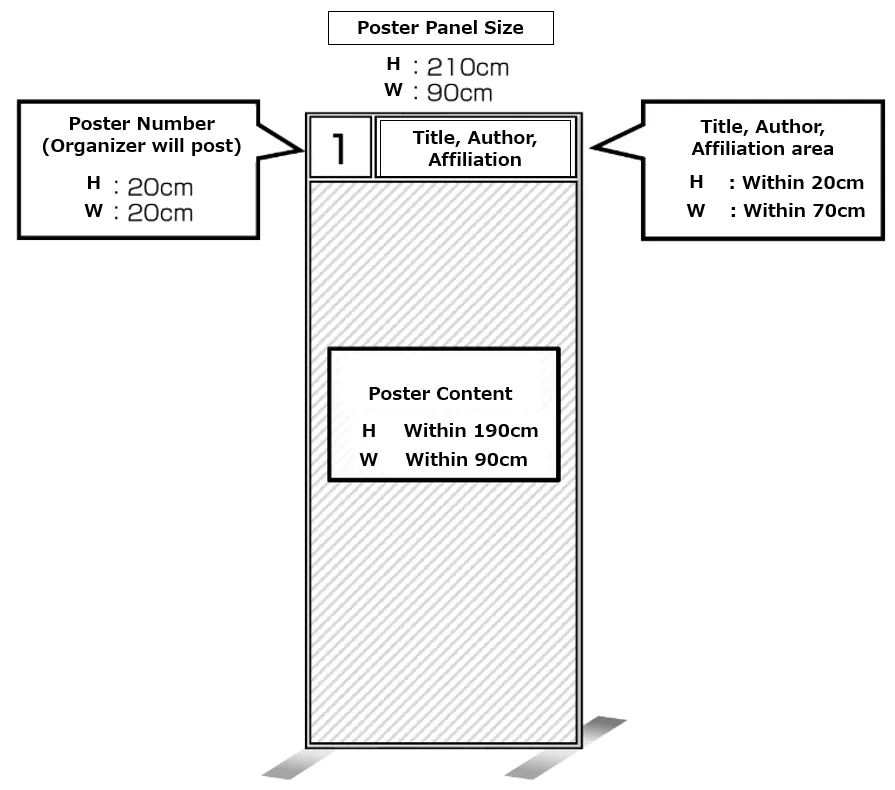
Important Notes
- When giving a presentation, please take care when handling names, initials, ID numbers and other details of cases that could potentially identify individuals.
- Photography, video recording and audio recording within the venue are prohibited without the permission of the 73rd Annual Meeting of the Japanese Society for Virology.